data · · Updated · 12 Min Read
Bar Graph vs Histogram: Differences and When to Use
Bar graphs compare categories, histograms show distribution. The differences, worked examples, and the reorder test that settles which you need.

Deepak Singh
Introduction
Choosing between a bar graph and a histogram confuses many students, analysts, and business professionals. While both charts use bars, they serve completely different purposes and work with different types of data.
A bar graph (also called bar chart) is used to compare distinct categories, such as sales by product, revenue by region, or team performance.
A histogram is designed to show the distribution of continuous numerical data, for example, how customer ages, order values, response times, or test scores are spread across ranges.
The biggest difference lies in data type and bar spacing: bar graphs use gaps to separate categories, while histogram bars touch each other to represent continuous data.
Bar Graph vs Histogram: The Short Answer
| Bar graph | Histogram | |
|---|---|---|
| Shows | Comparison between categories | Distribution of one numeric variable |
| X-axis holds | Category names | Numeric ranges (bins) |
| Bars | Separated by gaps | Touch, with no gaps |
| Reordering bars | Fine — order carries no meaning | Breaks the chart — order is the data |
If you can rearrange the bars without losing meaning, it is a bar graph. If rearranging them destroys the point, it is a histogram. Using the wrong chart can hide important patterns like skewness and outliers or make comparisons confusing.
In this guide, you’ll learn:
-
The clear differences between bar graph and histogram
-
Practical examples and when to use each
-
Common mistakes to avoid
-
How to choose the right chart every time
Mastering this distinction will help you create clearer visualizations, communicate insights better, and make smarter data-driven decisions.
What Is a Bar Graph?

A bar graph, also known as a bar chart, is a data visualization tool used to compare values across distinct categories. Each bar represents a separate category, and the height (or length) of the bar corresponds to its value.
The most important characteristic of a bar graph is that the bars are separated by gaps. These gaps clearly indicate that the categories are independent and not related on a continuous scale.
In simple terms, bar graphs make it easy to compare different groups at a glance, whether you're comparing sales figures, performance metrics, or survey results. The taller the bar, the higher the value for that category.
When to Use a Bar Graph
Bar graphs are the best choice when you have categorical (discrete) data and want to compare values between different groups or categories.
Common use cases for bar graphs include:
-
Comparing sales revenue across different regions or countries
-
Analyzing performance metrics by department or team
-
Visualizing survey responses by option or demographic
-
Tracking monthly revenue, website traffic, or customer acquisition by channel
-
Comparing product performance or market share
For example, if you want to see which product is selling the most, a bar graph allows stakeholders to instantly compare performance across all products with clarity.
Bar graphs are highly flexible and can be displayed in several formats:
-
Vertical bar charts (most commonly used)
-
Horizontal bar charts (ideal when category names are long)
-
Grouped bar charts (to compare multiple series side by side)
-
Stacked bar charts (to show composition of a total)
What Is a Histogram?

A histogram is a chart that shows the distribution of continuous numerical data. It divides the data into equal intervals called bins. Each bar represents the number of data points that fall into that interval.
The bars in a histogram touch each other with no gaps. This design shows that the data is continuous and can take any value within a range.
A histogram helps you see the shape of your data. It reveals whether the values are evenly spread, clustered in one area, skewed to the left or right, or contain outliers. These patterns are often hidden when you only look at averages.
When to Use a Histogram
Use a histogram when you have continuous numerical data and want to understand how the values are distributed across a range.
Common use cases include:
-
Analyzing customer age distribution
-
Understanding order value or spending ranges
-
Measuring response times or load times
-
Evaluating test scores or performance ratings
-
Detecting outliers in datasets
For example, a histogram can show whether most customers spend in the low, medium, or high price range. It helps you see the overall pattern in the data.
Histograms are not meant for comparing separate categories. If you want to compare discrete groups like sales by region or products, use a bar graph instead.
Think of it this way:
-
If you can name each bar (Product A, Region B, Plan C), you are looking at a bar graph.
-
If each bar represents a number range (0–10, 10–20, 20–30), you are looking at a histogram.

A simple way to tell the difference is by rearranging the bars. If shuffling them still makes sense, it’s a bar graph; if it breaks meaning, it’s a histogram. Bar graphs compare categories, while histograms show how values are distributed across ranges, making patterns in data easier to understand.
Histogram vs Bar Graph: Key Differences
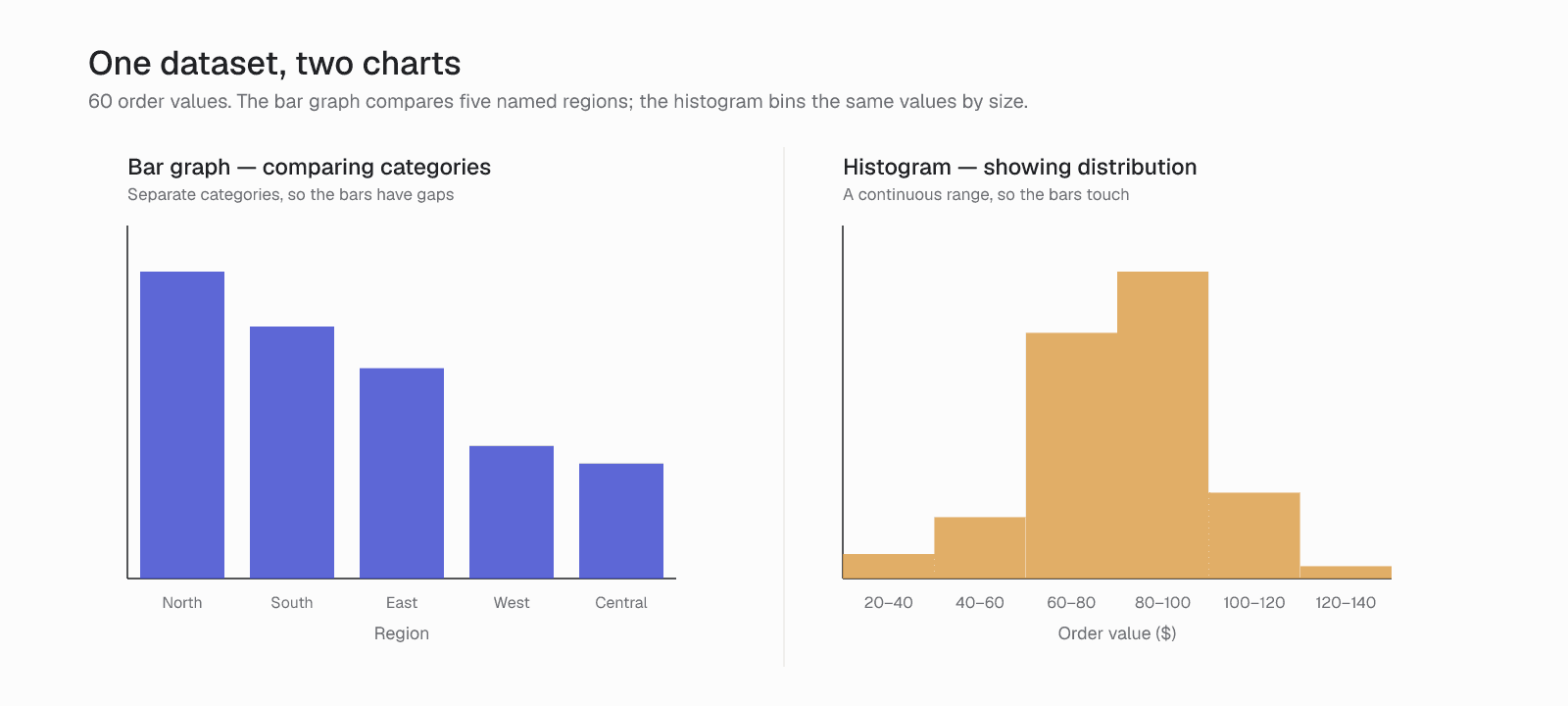
The main difference between a histogram and a bar graph is the type of data they are designed to show and the purpose they serve.
A bar graph compares values across distinct categories. A histogram shows how continuous numerical data is distributed across ranges.
For a straightforward academic explanation of the core differences, see this guide from the University of Wisconsin: University of Wisconsin’s clear explanation of bar graphs vs histograms.
Here is a clear comparison:
Histogram vs Bar Graph – Key Differences
| Feature | Bar Graph (Bar Chart) | Histogram |
|---|---|---|
| Data Type | Categorical (discrete groups) | Continuous (numerical data) |
| Purpose | Compare values between categories | Show distribution of data |
| Bars Represent | Individual category values | Frequency within ranges (bins) |
| Bar Spacing | Gaps between bars | Bars touch each other (no gaps) |
| Order of Bars | Can be rearranged any way | Must follow numerical order |
| X-Axis | Category names (products, regions) | Numeric intervals or ranges |
| Best Use Case | Sales by region, performance by team | Age distribution, order value ranges |
Every Difference Explained in Simple Terms
-
Data Type: Bar graphs work with categorical data such as products, regions, or departments. Histograms work with continuous data such as age, time, revenue, or test scores.
-
Bar Spacing: In a bar graph, bars have gaps because each category is separate. In a histogram, bars touch each other because the data flows continuously across ranges.
-
Ordering: You can sort or rearrange bars in a bar graph (for example, from highest to lowest). In a histogram, the bars must stay in numerical order.
-
Analytical Goal: Bar graphs help you compare different groups and spot which one is higher or lower. Histograms help you see the overall shape of the data and find patterns, clusters, or outliers.
"source: Storytelling with Data"
Real Business Use Cases
In real-world analytics, the bar graph vs histogram choice directly impacts how insights are understood. A bar graph is used to compare performance across categories, such as sales by region, users by plan, or revenue by product.
A histogram is used to analyze how data behaves across ranges, such as customer age distribution, order value ranges, or response times. It reveals patterns that category comparisons often miss.
For example, a retail team used a bar graph to compare average order value and saw stable performance. But after switching to a histogram, they discovered most customers were clustered in lower ranges, with a few high-value outliers skewing results, changing their strategy. Similar insights are discussed in data-driven decision-making research.
In dashboards, bar graphs support monitoring and reporting, while histograms enable deeper analysis and pattern detection. Lucidchart’s explanation of histogram vs bar graph
Common Mistakes to Avoid When Choosing Between Bar Graph and Histogram
Many people make the same mistakes when deciding between a bar graph and a histogram. These errors can hide important insights and lead to wrong conclusions.
Here are the most common mistakes:
-
Using a bar graph for continuous data This hides important patterns such as skewness, peaks, clusters, and outliers. The gaps between bars make the distribution harder to see.
-
Using a histogram for categorical data This makes comparison between categories confusing and less clear. Since the bars touch each other, it becomes difficult to quickly compare individual groups.
-
Choosing a chart based on habit instead of data type Many users pick the chart they are most familiar with rather than the one that best matches their data. This often happens in dashboards and reports.
Avoiding these mistakes is important. Choosing the right chart between a bar graph and a histogram helps you present data clearly, reveal true insights, and support better decision-making.
Best Tools to Create Bar Graphs and Histograms
Choosing the right chart type is important, but using the right tool is equally critical. The platform you choose can either help you avoid mistakes in bar graph vs histogram selection or make them more likely.
While many tools let you manually create charts, modern BI platforms can intelligently recommend the best visualization based on your actual data.
Why Use Supaboard for Creating Bar Graphs and Histograms
Supaboard is built to make data visualization faster and more accurate for analytics, product, and business teams, across 12 databases and warehouses.
Instead of manually struggling with histogram vs bar graph decisions, Supaboard analyzes your data and automatically suggests the most appropriate chart, whether it’s a bar graph for category comparisons or a histogram for distribution analysis.
Key advantages of using Supaboard:
-
Automatically detects data type and recommends the right chart (bar graph or histogram)
-
Create professional dashboards in minutes without writing SQL or code
-
Designed specifically for business and product teams who need fast, accurate insights
-
Reduces common visualization errors that often occur in traditional tools
-
Supports both categorical comparisons and continuous data distribution analysis seamlessly
-
Clean, interactive visualizations that are easy to share and understand
Whether you need to compare sales performance across regions using bar graphs or analyze customer age distribution with histograms, Supaboard helps you choose and create the right chart quickly and confidently.

Try Supaboard
If you want to create better dashboards and avoid common histogram vs bar graph mistakes, try Supaboard with your own data and see how it simplifies analysis.
Start on the Free plan and build your first dashboard in minutes, or Book A Demo
Which one is better for comparing data?
The bar graph, and it is not close — but only because "comparing" almost always means comparing categories, which is not what a histogram does.
The question is worth answering directly because it is the most common way people get this pair wrong. A histogram looks like a bar graph, so it gets used for comparison, and the resulting chart is not merely suboptimal — it is meaningless. Histogram bars represent ranges of a continuous variable, so their order is fixed and their widths are intervals. Rearranging them or comparing one to another the way you would compare two product lines is a category error.
Use a bar graph when the question is "which is bigger." Revenue by region, units by product, tickets by team. The categories are independent, the order is yours to choose (usually by value, descending), and the gaps between bars exist precisely to signal that independence.
Use a histogram when the question is "what does the spread look like." Order values, delivery times, ages, response latencies. You are not comparing bins to each other — you are reading the shape: where the mass sits, whether it is skewed, whether there is a second peak, whether there are outliers far from the centre.
Those questions are genuinely different, and the confusion usually starts with the question rather than the chart. "How do our order values compare?" is ambiguous: it could mean comparing average order value across segments (bar graph) or understanding the distribution of order values (histogram). Deciding which you meant resolves the chart choice immediately.
One practical tell: if you can reorder the bars without losing meaning, you want a bar graph. If reordering them destroys the chart, it is a histogram and comparison was never the point.
Frequently Asked Questions
What is the difference between a bar graph and a histogram?
A bar graph compares values across distinct categories, such as sales by region. A histogram shows how a continuous variable is distributed, such as the spread of order values. The difference is the data type, and it determines which questions each chart can honestly answer.
Why do histogram bars touch?
Because the horizontal axis is continuous. Each bar covers a range of values, and those ranges are adjacent with nothing between them, so gaps would imply values that cannot occur. Bar graphs use gaps for the opposite reason: to signal that the categories are independent of one another.
Which is better for comparing data?
The bar graph, because comparing almost always means comparing categories, which is not what a histogram does. Histogram bars represent ranges in a fixed order, so comparing one to another the way you would compare two product lines is a category error rather than merely a suboptimal choice.
How do I know which one I need?
Ask whether reordering the bars would destroy the meaning. If you can sort categories by value without losing anything, you want a bar graph. If reordering makes the chart nonsense because the sequence is the point, it is a histogram and comparison was never what you were doing.
Can I use a bar graph for continuous data?
Only after grouping it into categories deliberately, and you should be aware that you have changed the question. Binning continuous data and plotting it with gaps hides skew and outliers, which are usually the most informative features of a distribution and the reason you were looking at it.
What is a common mistake with these charts?
Using a histogram to compare groups, because it looks like a bar chart. The result is a chart that appears to rank things but actually shows a distribution in fixed order. Readers draw comparative conclusions from it, and those conclusions have no basis in what the chart depicts.
Conclusion
Understanding the difference between a bar graph and a histogram is one of the most important fundamentals of data visualization. Bar graphs are excellent for comparing categories, while histograms reveal the true distribution, patterns, and outliers in continuous data.
Using the wrong chart can distort insights, mislead stakeholders, and result in poor decisions, even when the underlying data is accurate.
By correctly matching the chart to your data type and goal, you make your analysis clearer, your reports more trustworthy, and your decisions more effective.
Modern tools like Supaboard's AI analysts take this even further by automatically recommending the right visualization, so teams can focus on insights instead of struggling with chart selection.
Start applying these principles today and turn your data into clear, actionable intelligence.
 8 Min Read