Data Querying: Meaning, Types, Examples & How It Works
Understand data querying, how queries work across databases and analytics tools, and how teams use them to explore data and make decisions.


Introduction: What Does It Mean to Query Data?
Most people often get confused between terms like query, data query, and database querying. These words are used everywhere in SQL tutorials, analytics tools, dashboards, and business conversations, but they do not always mean the same thing. This confusion becomes even more common as teams move from traditional databases to modern BI and AI powered analytics platforms.
As a data analyst, I have seen this misunderstanding create unnecessary complexity for both technical and non technical teams. By the end of this article, you will have a clear understanding of what each term means, how data querying actually works, and how it is used in real business scenarios, from simple searches to analytics workflows.
What Is a Query?
A query is a structured request used to ask a system for specific information. Instead of reviewing all available data, a query allows users or applications to define exactly what data is needed, from where, and under what conditions.
In data systems, queries act as instructions that tell databases how to locate, filter, or process information. Whether the task is retrieving records, updating values, or removing outdated data, everything begins with a query.
At a high level, a query answers one simple question:
Which data do you want, and what should be done with it?
Query in Technology vs Everyday Language
In everyday usage, a query simply means asking a question. Searching on Google, filtering products on an ecommerce site, or sorting messages in an inbox are all examples of queries running in the background.
In technology and databases, queries are more precise. Instead of informal questions, systems rely on defined instructions written in query languages such as SQL. These instructions specify:
• Which dataset or table to access
• Which conditions must be met
• Which results should be returned or changed
Across databases, search engines, APIs, and analytics tools, the goal remains the same: access the right information without manually scanning all data.
What Is Data Querying?
Data querying is the process of requesting specific information from a database or data source in a structured way. Instead of working with entire datasets, data querying allows users to retrieve, filter, update, or analyze only the data that matters for a specific question.
The purpose is simple. Ask a clear question and get a usable answer from the data.
At its core, data querying turns stored data into information that supports analysis, reporting, and decisions.
How Data Querying Works?
Most data querying follows the same flow:
• A user or system submits a query
• The database or platform interprets it
• Relevant data is searched and processed
• Results are returned in a readable format
The complexity is handled behind the scenes. What matters is asking the right question.
Why Data Querying Matters
Data querying is the foundation of how organizations interact with their data. It allows teams to:
Explore large datasets efficiently
Analyze trends and patterns
Generate reports and dashboards
Support data-driven decisions across teams
From analytics and reporting to automation and operational workflows, every data-driven system relies on effective querying to function.
Data Querying in Practice (Analyst Perspective)
From a data analyst’s perspective, querying is not just about writing SQL. It’s about asking the right questions of the data. Well-structured queries save time, reduce errors, and make insights easier to trust, especially when working with large, complex datasets used across multiple teams.
This is why modern analytics workflows focus as much on how data is queried as on what data is stored.
What Is a Database Query?
A database query is a structured request used to access, retrieve, or modify data stored inside a database. Whenever a user or application needs specific information, such as records, values, or summaries, it communicates that requirement to the database through a query.
In simple terms, a database query tells the database what data to work with and what action to perform on it. These actions commonly follow CRUD operations: create, read, update, and delete. Most relational databases use SQL (Structured Query Language) as the standard way to write and execute these queries.
What Does Query Mean in a Database?
In databases, a query works like a precise question asked to a very large and organized system. Instead of browsing records manually, a query allows you to:
• Select specific rows
• Return only required columns
• Apply conditions and logic
• Turn raw data into usable output
For example, when you ask a database to return customers who purchased in the last 30 days, the query filters and processes the data automatically and returns only matching results.
Once executed, the database engine searches one or more tables, applies the defined conditions, and presents the output in a human-readable format such as a table, report, or visualization.
How Database Queries Are Used in Real Systems?
Database queries power everyday tools:
• Dashboards and analytics reports
• Business applications and internal tools
• APIs that fetch only required data
• Search, filters, and forms inside apps
Most users never see the query, but they rely on its results constantly.
Types of Queries in Databases
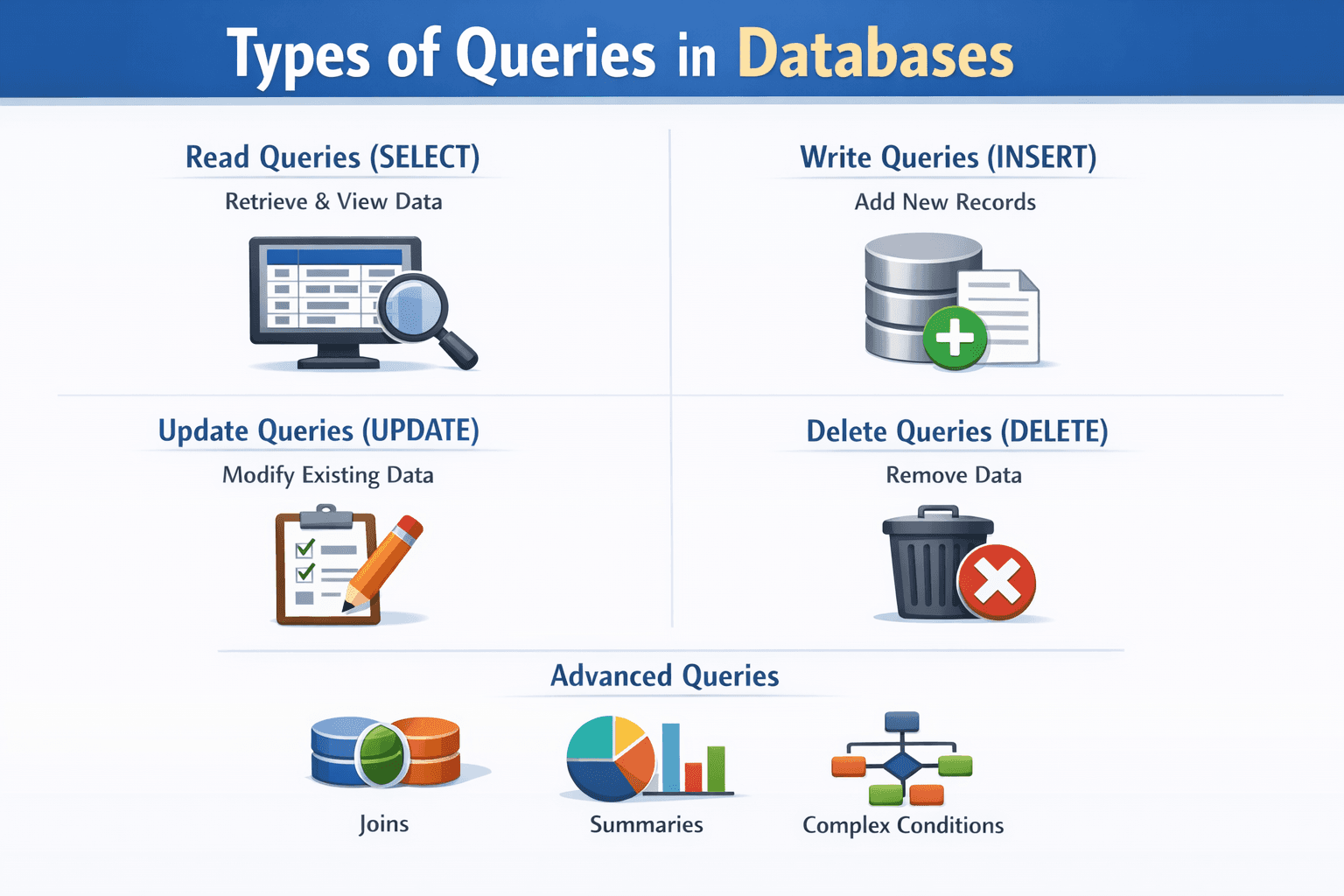
Read Queries (SELECT)
Read queries retrieve data without changing it. These are the most common queries used in analytics and reporting.
They allow teams to view, filter, sort, and summarize data safely.
Write Queries (INSERT)
Write queries add new data to a database. Whenever a new user, order, or event is created, a write query runs in the background.
Update Queries (UPDATE)
Update queries change existing records. They are used for tasks like updating statuses or correcting information.
Delete Queries (DELETE)
Delete queries permanently remove data. Because they cannot be easily undone, they are usually restricted in production systems.
Advanced Queries
Advanced queries support deeper analysis:
• Joining multiple tables
• Summarizing data
• Applying layered conditions
These are common in analytics and reporting workflows.
Real Business Examples of Data Querying
Marketing Example: CAC by Channel (Last 30 Days)
Business question:
Which marketing channels are costing the most to acquire customers this month?
What the query does:
It compares marketing spend with new customers and shows cost per acquisition by channel.
Why it matters:
Helps marketing teams decide where to scale spend and where to cut back.
Product Example: Weekly Active Users by Cohort
Business question:
Are newer users more engaged than older users?
What the query does:
It groups users by signup period and tracks weekly activity levels.
Why it matters:
Helps product teams understand retention and evaluate product changes.
Query vs Data Query vs Database Query
Term | Meaning | Scope |
Query | Any request for information | Very broad |
Data Query | Request focused on data analysis | Data focused |
Database Query | Structured instruction inside a database | Technical |
Simply put:
• A query is any question
• A data query asks a data question
• A database query is how systems execute it
Why Querying Data Is Important
Querying data helps organizations:
• Make better decisions
• Get answers faster
• Build reliable reports
• Improve operational efficiency
Real World Use Cases
• Business analytics and KPIs
• Marketing performance tracking
• Finance and forecasting
• Operations and monitoring
Querying is the foundation of data driven work.
Common Mistakes When Querying Data
Changing Too Much Data at Once
Forgetting to limit what data is affected can lead to serious errors.
Pulling More Data Than Needed
Fetching everything slows reports and dashboards.
Ignoring Missing Values
Empty data can distort totals and averages.
Date Confusion
Timezones and date filters often cause reporting mismatches.
These mistakes are common and avoidable with simple checks.
How Modern Data Querying Works Today?
Modern data querying has moved beyond writing SQL manually. While traditional querying relied heavily on technical users, today’s teams use BI tools and AI-powered analytics platforms to access data faster and with less effort.
Business intelligence tools allow users to query data through dashboards, filters, and visual reports, without writing code. On top of that, AI-powered features enable natural language querying, where users can ask questions in plain English and get instant answers.
This shift makes data accessible to non-technical users while keeping insights accurate and scalable.
Check top BI tools that really help teams query data efficiently
The Shift Toward Accessible Data Querying
According to McKinsey & Company,
“The value of analytics comes from making data accessible and usable in everyday decision making, not from technical sophistication alone.”
As organizations scale, the ability to query data easily, without deep technical skills, becomes critical. Modern analytics platforms focus on reducing friction between questions and answers, allowing teams to interact with data directly and confidently.
Querying Data Without the Complexity
As data grows, the challenge is not having data. It is getting answers quickly.
Modern platforms like Supaboard allow teams to explore data visually or ask questions in plain language. The technical querying happens in the background, making analytics faster and more intuitive.
What DBT Does Not Solve (And Why That’s Okay)
DBT (data build tool)does not solve everything. And that’s intentional.
It does not:
Replace BI tools
Make analytics no-code
Explain metrics in business language
Manage ingestion pipelines
DBT is built for technical users. Analysts, analytics engineers, data engineers. That focus is its strength.
Most teams eventually pair DBT with tools that sit above it, tools that help business users explore data, understand metrics, and ask questions without writing SQL. DBT ensures the foundation is solid. Other tools focus on accessibility.
Trying to make DBT do everything usually leads to frustration.
How Can I Get Started with DBT?
Most teams start small.
A single warehouse. A handful of models. One or two people owning the project. That’s enough.
The key is not perfection. It’s consistency. Write models clearly. Add tests where failures would hurt. Document things that would confuse the next person, because that next person might be you, six months later, under deadline pressure.
DBT rewards teams that think long-term, even when moving fast.
Training to Learn How to Use DBT
DBT is approachable, but it’s not trivial.
Teams usually learn it by:
Reading official docs alongside real projects
Reviewing existing DBT repos
Learning SQL modeling patterns
Understanding Git workflows
Getting comfortable with YAML, tests, and macros
The learning curve isn’t steep, but it’s real. Especially for teams transitioning from ad-hoc analytics to structured pipelines.
The payoff, though, is significant. Fewer surprises. More confidence. Less firefighting.
Frequently Asked Questions
1) What is a data query?
A data query is a request used to retrieve, filter, analyze, or modify specific data from a database or system. Instead of reviewing all data, a query helps users extract only the information needed to answer a particular question or support decision-making.
2) How do companies enable cross-functional teams to run advanced data queries without coding?
Companies use modern BI and analytics tools that provide visual dashboards and natural language querying. These platforms translate user actions or plain English questions into queries behind the scenes, allowing teams across marketing, finance, and operations to explore data without SQL or engineering support.
3) How do you compare dates in an SQL query?
Dates in SQL are compared using operators like
, or date functions. For example, filtering records from a specific period uses conditions on date columns, allowing analysts to analyze trends, time-based performance, or recent activity efficiently.
4) What is a database query?
A database query is a structured instruction executed within a database to retrieve, insert, update, or delete data. Written in languages like SQL, it tells the database exactly what data to access and what operation to perform in a precise and scalable way.
Conclusion
Querying data is how modern organizations turn information into action. Understanding the difference between a query, a data query, and a database query removes confusion and helps teams work faster.
Today, querying is no longer limited to SQL experts. With dashboards, BI tools, and AI powered analytics, teams across functions can access insights confidently. When querying feels simple, data becomes useful, decisions improve, and businesses move forward with clarity.