Best Looker Alternatives for Modern Analytics in 2026
Find the best Looker alternatives for modern analytics. Compare Looker-like BI tools for enterprises, from AI-powered platforms to open-source options.


Why Teams Are Searching for Looker Like Analytics Tools
Today, businesses need analytics platforms that are fast, flexible, and well-governed. While Looker has been a popular BI tool for years, many teams find it complex, expensive, and heavily reliant on technical resources.
As a result, teams are searching for “Looker-like” tools, modern analytics platforms that provide self-serve insights, consistent metrics, real-time dashboards, and embedded reporting that scales. This guide explores the most popular Looker alternatives in 2026 and helps you understand which platform might be the right fit for your organization.
What Makes an Analytics Tool Truly Looker Like?
A Looker-like analytics tool balances governance, flexibility, and ease of use, ensuring data stays consistent while teams can explore insights independently. In practice, this means delivering the following core capabilities:
Centralized semantic or metrics layer
KPIs such as revenue, churn, or conversion rate are defined once and reused consistently across dashboards for marketing, finance, and leadership, preventing metric mismatches.Drag and drop exploration with minimal technical dependency
Business users can build and adjust dashboards visually, without writing SQL or waiting on engineers for every change.Real-time dashboards for faster decision-making
Teams can monitor performance as it happens, tracking campaigns, sales, or operations in near real time instead of relying on static reports.Natural language “Ask” features for instant insights
Users can ask questions (for example, “How did signups perform last week by channel?”) and get immediate, data-backed answers.
Top Reasons Why Users Are Moving to Looker Alternatives?
Many teams are moving away from Looker due to high costs, complex learning languages, and limited flexibility. They hate the visualization options, and it fails to connect data, analysts, and business users within a single unified tool, reducing overall efficiency.
High Costs & Poor ROI
After Google’s acquisition, pricing has increased significantly. Many organizations struggle to justify the cost compared to modern BI tools that offer similar or better capabilities at a lower price point.Steep Learning Curve & Dependency on LookML
Looker relies heavily on LookML, a proprietary modeling language. This creates dependency on analysts or engineers, making it harder for business users to explore data independently and slowing down workflows.Limited Visualization & Customization
Users often hate the visualization options due to limited flexibility and outdated design. Compared to modern tools, dashboards feel restrictive, especially for teams needing advanced customization or embedded analytics.Disconnected Experience Across Teams
Looker fails to connect data, analysts, and business users in a single seamless tool. This fragmentation reduces collaboration and prevents true self-service analytics across the organization.Performance Issues & Slower Innovation
Teams report slower query performance, complex schema updates, and declining support quality. Combined with slower feature innovation, Looker feels less competitive in a fast-evolving analytics ecosystem.
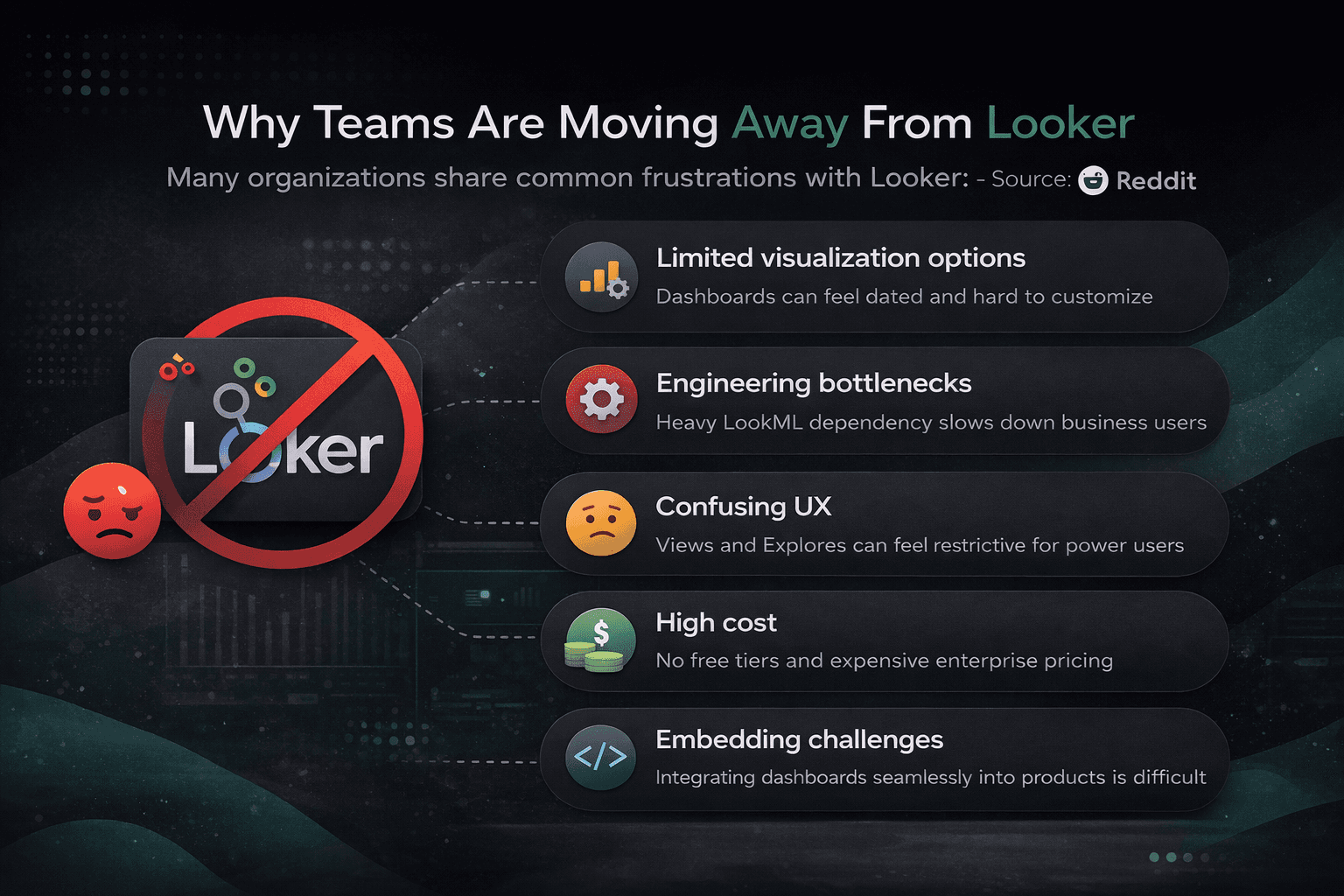
“True self‑service BI is hard; business users end up relying on analysts or LookML experts. Even simple reports can take days to get approved or updated.” Reddit user, r/BusinessIntelligence.
Looker vs Looker Alternatives: Cost, Complexity, LookML Dependency & Self-Service Analytics
In practice, teams don’t leave Looker because it lacks capability, they move on because it demands too much effort to operate efficiently. Modern BI tools are shifting toward speed, usability, and alignment across teams, which changes how these platforms are evaluated.
Setup & Onboarding
Getting started with Looker usually involves significant configuration across data models and permissions. Many alternatives reduce this friction with plug-and-play integrations and guided setups, allowing teams to move from data connection to insights much faster.Engineering Dependency (LookML Complexity)
LookML introduces a structured way to manage data, but it also centralizes control with technical users. This often creates delays in reporting cycles, whereas newer tools prioritize direct access through visual modeling and assisted exploration.Pricing & Total Cost of Ownership
Costs with Looker extend beyond licensing, especially with warehouse usage and supporting tools. Alternatives often simplify this with clearer pricing structures, making it easier to scale without unexpected expenses.Team Flexibility & Self-Service Analytics
Looker fits well in tightly controlled BI setups, but broader teams may find it restrictive. Many newer platforms focus on accessibility, enabling different functions to explore and act on data without relying on a central team.Visualization & User Experience
Dashboard creation in Looker can feel limiting when compared to newer tools. Alternatives tend to offer more flexibility in design and interactivity, which becomes important for both internal use and external-facing reports.
Best Looker Alternatives in 2026: Top BI Tools Comparison
Many teams are actively searching for Looker alternatives due to Looker pricing issues, steep LookML learning curve, performance bottlenecks, and limited self-service capabilities. If you're evaluating a Looker replacement, considering a switch from Looker, or exploring affordable alternatives to Looker and easier-to-use Looker alternatives, this guide breaks down the strongest options available in 2026.
Here are the top business intelligence tools looker like, ranked by real-world adoption, governance strength, and modern analytics needs.
1. Power BI – Best for Microsoft Ecosystem Teams & Looker vs Power BI Comparison
Power BI is one of the most popular Looker alternatives for organizations already using Microsoft tools. It provides scalable reporting, strong governance, and significantly lower costs compared to Looker, making it a practical choice for teams facing Looker cost issues.
Key Features
Deep integration with Excel, Azure, Teams, and Microsoft Fabric
Real-time dashboards and automated reporting
AI-powered forecasting, anomaly detection, and natural language Q&A
Enterprise-grade security with row-level security and compliance
Large visualization marketplace
Pros
Much more affordable than Looker for most enterprises
Familiar workflows reduce the learning curve
Strong governance and scalability across departments
Cons
DAX can feel complex for beginners
Best performance and experience require staying within the Microsoft ecosystem
Large models can impact dashboard speed
Best For: Enterprises and finance/operations teams looking for a cost-effective Looker replacement with excellent Microsoft integration.
2. Supaboard – Best AI-Powered Looker Alternative for Self-Service Analytics
Supaboard is a modern AI-powered Looker alternative built for teams that want governed self-service analytics without the Looker complexity, heavy LookML modeling, or high dependency on data engineers.
Key Features
Centralized semantic layer and governed metrics for consistent KPIs
AI natural language analytics and instant dashboard generation
SQL + no-code data exploration
Real-time dashboards and embedded analytics
Robust role-based permissions and governance
Pros
Faster deployment and time-to-insight than traditional tools like Looker
Reduces analyst dependency while maintaining strong governance
Modern AI-first experience that is more user-friendly
Cons
Newer platform with a smaller ecosystem than legacy BI tools
Enterprise implementations may need guided onboarding
Best For: SaaS, fintech, healthcare, and data-driven companies seeking self-service analytics tools, embedded analytics platforms, and BI tools without LookML.
3. Tableau – Best for Advanced Visualizations & Storytelling (Looker vs Tableau)
Tableau continues to lead when teams prioritize best-in-class visualizations and executive dashboard storytelling. In Looker vs Tableau discussions, Tableau often wins on visual quality and storytelling depth.
Key Features
Industry-leading drag-and-drop visualizations and customization
Tableau Pulse for AI-driven metric monitoring and alerts
Tableau Agent – conversational AI assistant
Strong dashboard storytelling and narrative tools
Embedded analytics capabilities
Pros
Superior visualization quality and flexibility
Excellent for executive reporting and data storytelling
Mature enterprise platform with broad integrations
Cons
Higher pricing at scale compared to Power BI
Steeper learning curve for advanced features
Best For: Analytics teams that need data visualization tools with high polish and strong storytelling for stakeholders.
4. Qlik Sense – Best for Exploratory Analytics on Complex Data
Qlik Sense is favored by large enterprises for its associative analytics engine, which enables flexible data discovery beyond rigid predefined paths.
Key Features
Associative engine for deeper data exploration
AI recommendations and insights
Real-time data integration and strong governance
Embedded analytics support
Pros
Excellent for complex, exploratory analytics
Handles interconnected datasets well
Strong enterprise scalability and security
Cons
Higher learning curve than newer AI-first tools
Interface can feel less intuitive for business users
Best For: Large enterprises with advanced analytics needs and real-time analytics requirements on complex datasets.
5. ThoughtSpot – Best for Search-Driven & Conversational Analytics
ThoughtSpot takes a search-first approach, making it ideal for business users who want fast answers through natural language without building traditional dashboards.
Key Features
Powerful natural language search and conversational analytics
AI-powered insights and automated anomaly detection
Live querying from cloud data warehouses
Embedded analytics workflows
Pros
Extremely easy for non-technical business users
Fast ad-hoc analysis and reduced analyst dependency
Strong AI-driven experience
Cons
Higher pricing
Less flexible for heavy traditional dashboarding and complex modeling
Best For: Teams prioritizing self-service analytics tools and easy-to-use Looker alternatives focused on speed and conversational insights.
How to Choose the Right Looker Alternative in 2026
Microsoft-heavy environments → Power BI
AI-first self-service with governance → Supaboard
Best visualizations & storytelling → Tableau
Complex exploratory analytics → Qlik Sense
Search-driven business user experience → ThoughtSpot
Consider your tech stack (Snowflake, BigQuery, etc.), need for embedded analytics, team skill levels, and total cost of ownership. Focus on tools that balance governance, usability, and scalability.
Need help deciding? Tell me your team size, current data warehouse, primary use case (embedded, operational reporting, self-service, etc.), and budget — I can give a more targeted recommendation.
How to Choose the Best Looker Alternative in 2026
Selecting the right Looker replacement comes down to matching the tool to your team’s needs, not just comparing feature lists. Here’s a practical framework to evaluate Looker alternatives effectively:
1. Clarify Your Primary Use Case Start with what you need most:
Embedded analytics for customer or internal apps
Fast self-service analytics for business users
Operational or marketing dashboards
Advanced ad-hoc exploration and deep data discovery
2. Balance Governance and Usability Look for a strong semantic layer and governed metrics to ensure consistent KPIs across teams. At the same time, prioritize tools with low LookML learning curve and modern AI features (natural language querying, instant insights) so non-technical users can explore data safely without heavy SQL or engineering support.
3. Check Compatibility with Your Tech Stack The best business intelligence tool like Looker should integrate smoothly with your data warehouse (Snowflake, BigQuery, Redshift) and existing ecosystem — especially Microsoft Fabric, AWS, or cloud-native platforms for faster deployment and scaling.
4. Evaluate Total Cost of Ownership Don’t focus only on license fees. Consider Looker pricing alternatives that offer predictable costs, reduced analyst dependency, easier maintenance, and strong scalability. Factor in hidden costs of complexity and migration effort from Looker.
5. Essential Modern Features Prioritize platforms that deliver:
Centralized semantic layer for metric consistency
AI-augmented analytics and conversational capabilities
Real-time dashboards and flexible visualizations
Robust governance, security, and embedded analytics support
Smooth migration path from existing BI systems
Frequently Asked Question (FAQs)
1. What is the best Looker Studio alternative in 2026?
The best Looker Studio alternative depends on your use case, but Microsoft Power BI is often considered the top all-around BI tool. It offers advanced data analytics, strong visualization capabilities, and seamless integration with Microsoft 365. For teams looking for modern AI-powered analytics, tools like Supaboard and ThoughtSpot are also emerging as strong alternatives.
2. Which Looker alternative is best for non-technical users?
For non-technical users, the best Looker alternatives are tools that support natural language queries and self-service analytics. Platforms like Supaboard, ThoughtSpot, and Tableau (with Ask Data) allow users to ask questions instead of building dashboards manually, making data more accessible without SQL or technical expertise.
3. When should you hire a data visualization consultant?
You should hire a data visualization consultant when your team struggles with BI tool selection, dashboard design, or data modeling. A consultant helps align the right BI platform with your business goals, improves dashboard usability, and ensures better ROI from your data analytics investment—especially in complex enterprise environments.
4. What are the best dashboard tools for enterprises?
The best enterprise dashboard tools include Tableau, Power BI, Looker, and Domo. These platforms offer advanced analytics, scalability, and enterprise-grade security. For companies focusing on embedded analytics or white-label solutions, newer tools like Supaboard provide more flexibility and control over the user experience.
5. Are there free alternatives to Looker Studio?
Yes, several free Looker Studio alternatives are available. Power BI Desktop, Metabase (open-source), and Google Looker Studio itself offer free plans with strong core features. These tools are ideal for startups and small teams looking to build dashboards without high upfront costs.
6. What is the best open-source Looker alternative?
Metabase is one of the best open-source alternatives to Looker Studio. It is easy to set up, supports self-service analytics, and allows embedding dashboards into applications. However, for more advanced analytics or AI-driven insights, businesses often move to more scalable BI platforms.
7. Which BI tool is best for embedded analytics?
For embedded analytics, tools like Supaboard, Metabase, and Looker are commonly used. Supaboard stands out for offering white-label analytics and AI-driven insights, while Metabase is popular for open-source embedding. The right choice depends on whether you need flexibility, branding control, or advanced analytics.
8. What should you look for in a Looker Studio alternative?
When choosing a Looker Studio alternative, consider:
Ease of use (self-service analytics)
Data integration capabilities
Real-time reporting and dashboards
AI-powered insights
Embedding and white-label options
Pricing and scalability
The best BI tools today are shifting from static dashboards to instant, context-aware insights, making decision-making faster.
Final Verdict: Best Looker Alternatives in 2026
The best Looker alternative in 2026 ultimately depends on your priorities, whether you need lower costs, better self-service analytics, superior visualizations, or powerful AI capabilities.
If you're planning to switch from Looker, the top contenders stand out for different reasons:
Power BI is the smartest choice for most Microsoft-centric enterprises looking for an affordable and scalable Looker replacement.
Supaboard shines as the best modern AI-powered Looker alternative for teams that want fast, governed self-service analytics without the LookML learning curve or heavy data team dependency.
Tableau remains the leader for teams that prioritize stunning visualizations and executive storytelling.
ThoughtSpot excels when business users need instant answers through natural language search.
Qlik Sense is ideal for large enterprises requiring deep exploratory analytics on complex datasets.
Final Recommendation: For most growing companies and SaaS teams, Supaboard offers the best balance of AI-driven usability, strong governance, and fast time-to-insight, making it one of the strongest Looker alternatives available today. Teams frustrated with high Looker pricing, rigid modeling, and limited self-service are increasingly moving toward modern platforms that combine a centralized semantic layer with effortless analytics.
Ultimately, the right business intelligence tool like Looker is the one that fits your data stack, empowers both technical and business users, and delivers measurable ROI through better adoption and faster decisions.
Ready to make the switch? Evaluate based on your use case, budget, and need for embedded analytics or self-service analytics tools, and choose a platform that will grow with your team