How to Evaluate AI BI Tools: The 12 Questions Most Demos Can't Survive
12 questions to ask any AI BI vendor before you buy. The ones that break a rigged demo and reveal real AI from a text-to-SQL wrapper.

Before You Buy an AI BI Tool, Ask These 12 Questions
If you've sat through more than two AI BI demos, you've probably noticed they all look the same. Someone types "show me revenue by month" into a chat box, a clean line chart appears in two seconds, the room nods, and everyone moves on. It's genuinely impressive the first time. It's also close to meaningless.
That demo is rigged. Not maliciously, just structurally. The vendor controls the dataset, so it's already clean and pre-modelled. The vendor controls the question, so it's one any tool can answer. And the vendor controls the follow-up, so nobody asks the messy second question that real work is made of. Under those conditions, a serious AI BI platform and a thin text-to-SQL wrapper look identical. That's the trap. The whole category has learned to demo to its strengths and hide where it falls apart.
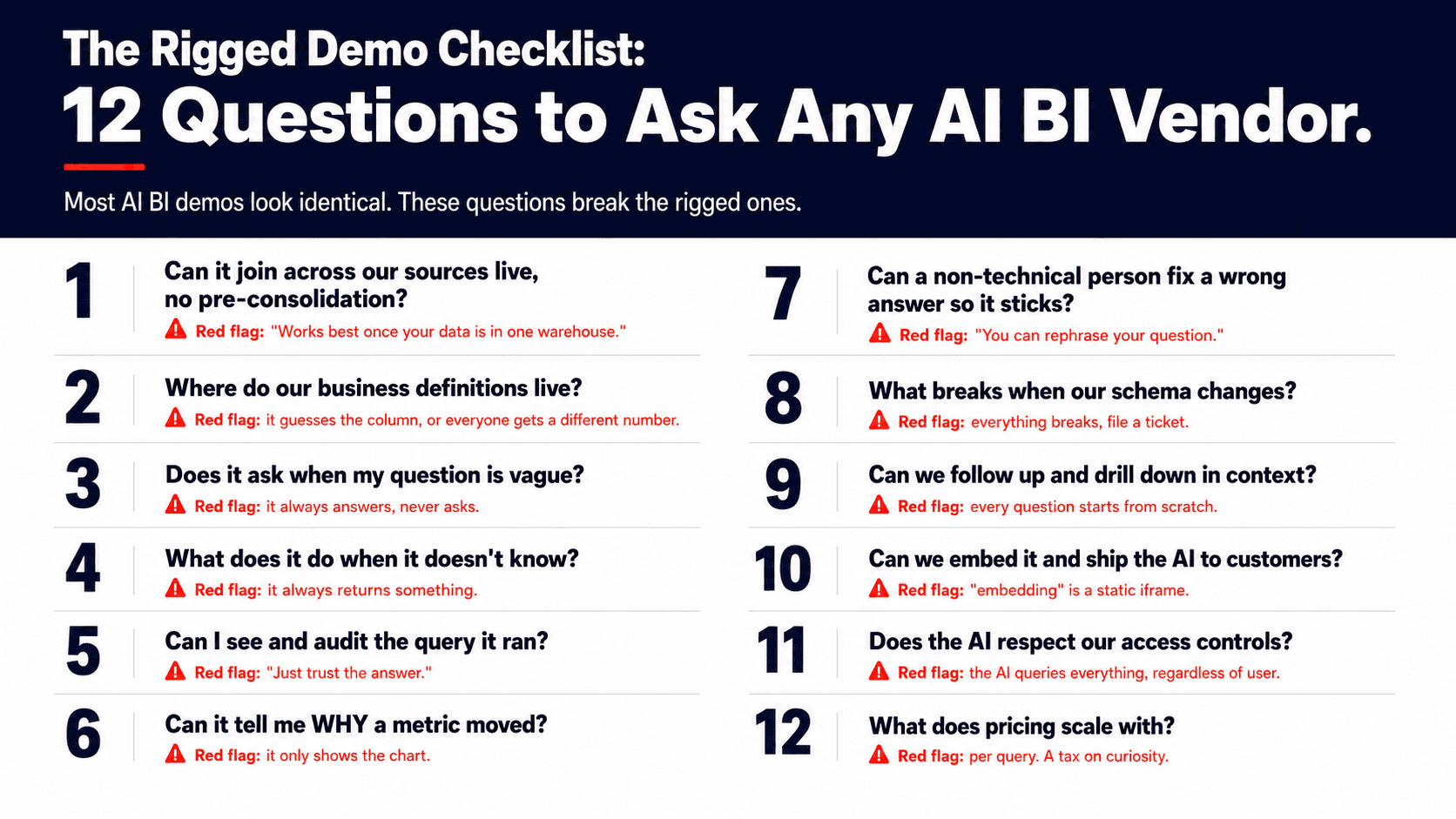
The questions below are the ones that break the rigged demo. Each one targets the exact place where a wrapper cracks and a real system holds. I call it the Rigged Demo Checklist. Ask these on your next call and watch how fast the polished story gets specific or gets vague.
The 12 questions at a glance
If you only take one thing from this post, take this list and paste it into your evaluation doc:
How does it handle joins across multiple data sources?
Does it understand our business definitions, or does it guess?
When my question is vague, does it ask what I mean or just guess an answer?
What does it do when it genuinely doesn't know?
Can I see and audit the exact query it ran?
Can it tell me why a metric changed, not just what changed?
When it gets something wrong, can a non-technical person fix it, and does that fix stick for everyone?
What happens when our schema or data model changes?
Can my team keep the conversation going with follow-ups and drill-downs?
Can I embed it in my own product and ship it with the AI inside?
How does it handle data governance and access control?
What does pricing actually scale with?
Now the detail. For each question I'll give you the exact wording to use, why it matters, what a good answer sounds like, and the red flag that tells you to keep your wallet closed.
1. How does it handle joins across multiple data sources?
Ask it like this: "Our data lives in Salesforce, our product database, and a warehouse. Can you answer a question that spans all three, live, without me pre-joining anything first?"
Why it matters: Almost no real business question lives inside a single table. The value of AI BI is answering questions that cross systems, and joining messy sources correctly is the hard part that separates a real engine from a chat box on one database.
A good answer sounds like: it joins across your sources at query time using a defined model of how your tables relate, so you ask the question in business terms and the system figures out the plumbing.
The red flag: "It works best once your data is consolidated into one warehouse." Translation: it can't do the hard part, so it's asking you to do it first. If the tool needs your data pre-stitched to look smart, you're buying the easy 20 percent and keeping the other 80 percent for yourself.
2. Does it understand our business definitions, or does it guess?
Ask it like this: "When I say 'active customer' or 'net revenue,' where does that definition live, and what stops two people from getting two different numbers?"
Why it matters: Every company has its own definitions, and they rarely match the raw column names in the database. A tool that guesses which field you mean will confidently average the wrong thing, and you won't notice until a number in a board deck is wrong.
A good answer sounds like: there's a semantic layer where each metric is defined once, centrally, so the tool reads your definition instead of inventing one, and everyone who asks gets the same answer.
The red flag: it asks "which revenue field?" every single time, or worse, silently picks one and never tells you. If two analysts can ask the same question and get two different numbers, you didn't buy BI. You bought a random number generator with autocomplete.
3. When my question is vague, does it ask what I mean or just guess an answer?
Ask it like this: Type something deliberately underspecified, like "how are we doing this quarter," and watch what happens next.
Why it matters: Real questions from real people are often ambiguous, and the safe response to ambiguity is to ask a short clarifying question, not to manufacture confidence. A tool that always has an answer and never has a question is optimizing to look smart, not to be right.
A good answer sounds like: it pauses and asks one sharp follow-up before running anything, the way a good analyst would.
The red flag: it instantly returns a confident chart for a question that had four possible meanings. A tool that never asks you anything isn't confident. It's just fast at being wrong.
4. What does it do when it genuinely doesn't know?
Ask it like this: "Show me a metric you don't have data for. What happens?"
Why it matters: The most dangerous BI tool is the one that never says "I don't have that." A made-up number that lands in a forecast or a board deck costs far more than an honest blank.
A good answer sounds like: it tells you plainly that the data isn't connected or the question can't be answered with what's available, and points you at what it would need.
The red flag: it always returns something, because returning something always demos better than admitting a gap. If a tool will never tell you "I can't answer that," you can't trust the answers it does give.
5. Can I see and audit the exact query it ran?
Ask it like this: "Show me the actual query behind this number. Can I read it, verify it, and save it for next time?"
Why it matters: If you're going to make decisions on an AI's answer, you need to be able to check its work, and you need approved logic to be reusable so the right answer happens by default next time.
A good answer sounds like: you can open the exact query, read it, verify it, and save it as an approved, reusable definition that future questions build on.
The red flag: "you can just trust the answer," with no way to see how it got there. A black box that won't show its work is asking you to put your name on its guess.
6. Can it tell me why a metric changed, not just what changed?
Ask it like this: "Revenue dropped 8 percent last month. Don't show me the chart. Tell me why."
Why it matters: Anyone can render a line going down. The work you actually pay an analyst for is the diagnosis: which segment, which account, which change moved the number.
A good answer sounds like: it surfaces the drivers behind the movement, the specific account that churned or the region that softened, not just the trend line.
The red flag: it can draw the decline beautifully but has nothing to say about the cause. If it only does "what," you didn't buy an analyst. You bought a faster way to make charts.
7. When it gets something wrong, can a non-technical person fix it, and does that fix stick for everyone?
Ask it like this: "It just gave a wrong answer. I'm in sales ops, not engineering. Walk me through how I correct it, and tell me whether my correction helps the next person or just me."
Why it matters: Every AI BI tool will be wrong sometimes. What separates a real platform is whether a normal employee can correct the logic and have that correction become the new source of truth for the whole team, not a private patch.
A good answer sounds like: a non-technical person can flag the wrong answer, fix the underlying logic, and that fix becomes the default for everyone going forward.
The red flag: "you can rephrase your question." That's not the tool learning. That's you doing the tool's job forever. If the only fix for a wrong answer is to ask it differently, every employee will keep tripping over the same wrong answer until the end of time.
8. What happens when our schema or data model changes?
Ask it like this: "We rename a column and add a table next quarter. What breaks?"
Why it matters: Your data model is not frozen, it evolves constantly, and a system that shatters every time it changes will quietly stop being used. Resilience to change is the difference between a tool you adopt and a tool you abandon.
A good answer sounds like: it adapts using what it already knows about your old model and asks you to confirm the parts it's unsure about, instead of silently producing wrong numbers or going dark.
The red flag: everything breaks and you file a ticket. If renaming a column takes down your reporting, you didn't buy AI. You bought brittle hardcoded queries with a chat box bolted on top.
9. Can my team keep the conversation going with follow-ups and drill-downs?
Ask it like this: Ask one question, then say "okay, now just the West region," then "and only last quarter." Does it hold the thread?
Why it matters: Real analysis is a conversation, not a single query. This matters most for sales reporting, where reps and managers live in follow-ups: same metric, narrower region, different time frame, one tweak at a time.
A good answer sounds like: you can drill down and refine naturally and it remembers the context, so each follow-up builds on the last instead of starting over.
The red flag: every question is a blank slate and you have to restate the full context each time. If you keep retyping "for the West region in Q1" on every line, it's a search bar, not an analyst.
10. Can I embed it in my own product and ship it with the AI inside?
Ask it like this: "I want my customers to see their own analytics inside my product, and I want them to be able to ask questions too. Show me what they'd actually experience."
Why it matters: For embedded reporting, the question isn't just whether a dashboard can be dropped into your app. It's whether the AI querying experience and the governance travel with it, so your customers get the same intelligence your internal team does.
A good answer sounds like: you can turn key metrics into a dashboard, embed it in your own product, and ship it with the AI querying intact and permissions respected for each of your customers.
The red flag: "embedding" turns out to be an iframe of a static dashboard with none of the AI, or it's view-only. An iframe of a frozen chart isn't embedded analytics. It's a screenshot with extra steps.
11. How does it handle data governance and access control?
Ask it like this: "If a user isn't allowed to see executive comp data in a dashboard, can the AI reveal it in a chat answer?"
Why it matters: An AI layer that ignores your existing permissions is a brand new way to leak data, because it can surface in a sentence what a user could never open in a report. Governance has to apply to the answers, not just the dashboards.
A good answer sounds like: the agent respects the same row-level and role-based permissions as the rest of your stack, so a user can only get answers from data they're already allowed to see.
The red flag: the AI queries everything regardless of who's asking. If the agent doesn't honor your access controls, every chat is a potential data breach delivered in a friendly tone.
12. What does pricing actually scale with?
Ask it like this: "Walk me through exactly what makes my bill go up. Is it seats, data, or the number of questions we ask?"
Why it matters: Pricing tells you what the vendor expects you to do less of. Anything that scales with usage punishes the adoption you're paying to create, and you'll feel it the moment the tool actually catches on internally.
A good answer sounds like: pricing scales with something predictable you can plan around, like seats or data volume, rather than with how often your team dares to use it.
The red flag: pricing scales per query or per "question asked." That's a tax on curiosity. If your bill grows every time your team uses the product more, you will quietly train your team to use it less, which is the exact opposite of why you bought it.
How to run a real evaluation, not just watch a demo
The checklist works best when you stop being a passenger on the demo. Three things turn a sales call into a real evaluation.
First, bring your own data and your own ugly question. Not the clean one the vendor would pick. The one with a weird join, a fuzzy definition, and an obvious follow-up. The gap between how a tool handles their question and yours is the entire story.
Second, ask who has to be involved and for how long before you see value. A real answer to setup is measured in days and names the one or two people on your side who need to be in the room, usually whoever owns your data definitions. A vague "it depends on your environment" that turns into a multi-month services engagement is its own red flag.
Third, run a short paid or trial pilot with real users, not just the champion who ran the demo. Let a salesperson and a non-technical ops person live in it for a week and try to break it. The tool that survives your team's actual questions is the one to buy.
[ANECDOTE SLOT — see note at the end of this file. Drop your real story here. It belongs right here in the closing, as the proof that these questions matter in the wild.]
If you want the condensed version to bring on calls, grab the one-page Rigged Demo Checklist below. It's the 12 questions plus the red flag for each, on a single sheet you can keep open during a demo.
FAQ
What should I ask an AI BI vendor before buying?
Ask the questions a rigged demo can't survive: how it joins across multiple data sources, where your business definitions live, what it does when it's unsure or wrong, whether you can audit the query, and what your bill actually scales with. The fastest filter is to bring your own messy data and your own ambiguous question instead of using the dataset and question the vendor prepared.
How do I know if an AI BI tool is just a text-to-SQL wrapper?
A wrapper translates a clean question into SQL against a single, well-modeled table and stops there. You can spot one in minutes: it needs your data pre-consolidated, it guesses at your definitions, it never asks a clarifying question, it can't explain why a metric changed, and there's no way for a non-technical person to correct it so the fix sticks. Real AI BI holds up when the data is messy and the question is vague.
How long should AI BI setup take?
For a tool built to read your existing sources and definitions, meaningful value should arrive in days, not quarters, and it should mostly need whoever owns your data definitions rather than a dedicated engineering project. If a vendor's honest answer to setup is a multi-month services engagement before you see a real answer, treat that as a signal about how the product actually works.
What's the difference between AI BI and a chatbot on top of my database?
A chatbot on a database answers one question against whatever it can reach and forgets it the moment you ask the next one. AI BI maintains a model of your business: shared definitions, relationships across sources, memory across a conversation, auditable logic, and corrections that persist for the whole team. The chatbot is a feature. The model is the product.
How should I evaluate a BI tool for sales reporting?
Sales reporting lives in follow-ups, so test the conversation, not the single query. Ask one question, then narrow by region, then by time frame, then by rep, and see whether each refinement builds on the last or starts from scratch. Also check that your team's definitions of "pipeline," "closed won," and "active account" are consistent for everyone, because nothing erodes trust in sales reporting faster than two managers pulling two different numbers.
How do I evaluate a BI tool for embedded reporting?
Look past whether a dashboard can be dropped into your app and ask what your customers actually experience. Confirm that the AI querying and the access controls travel into the embed, so each customer can ask questions and only ever sees their own data. An embed that's a static, view-only iframe with the intelligence stripped out is not embedded analytics in any meaningful sense.